This site is obviously no longer maintained as the focus for the past 4 years has been on my business, Discovered Intelligence. Any new blog entries can be found there, so feel free to visit https://discoveredintelligence.ca
This site is obviously no longer maintained as the focus for the past 4 years has been on my business, Discovered Intelligence. Any new blog entries can be found there, so feel free to visit https://discoveredintelligence.ca
If you’ve read some of my previous posts you would know by now that something I started splunking for security, and even environmental, purposes a long while back was badge data from badge entry devices. The use of this data can provide many different use cases for security analysts and intellignece programs, here is one specific use case I outlined at the start of this year that addressed an issue that made national headlines:
http://www.joshd.ca/content/using-splunk-catch-pesky-employees-outsourcing-their-job
And then here’s a post where I detailed a environmental use case:
http://www.joshd.ca/content/server-room-temps-and-human-effect-basic-reporting-splunk
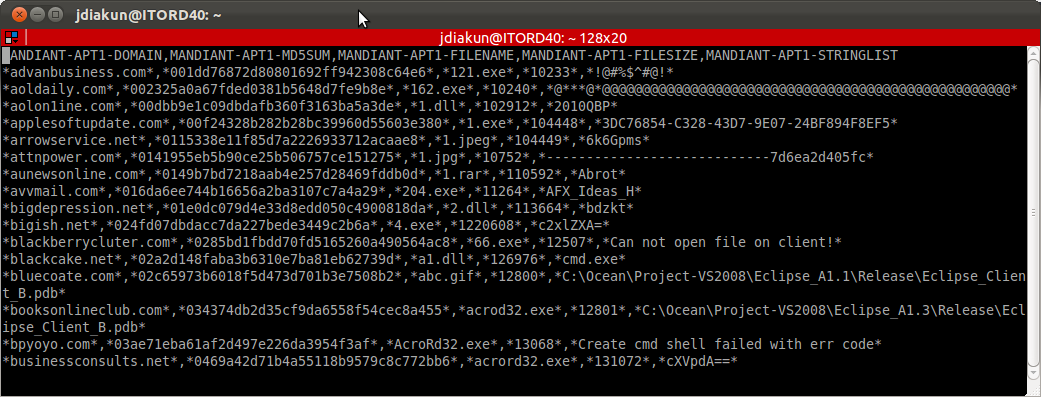
I think it’s safe to say at this point everyone and their dog’s dog has heard in some form or another about the Mandiant report released entitled “APT1: Exposing One of China’s Cyber Espionage Units”. Regardless of what you think of the report – Jeffrey Carr has a good rebuttal – the one thing it does give us is a LARGE amount of indicators which can be made into actionable intelligence and I HIGHLY commend Mandiant on sharing this intelligence!
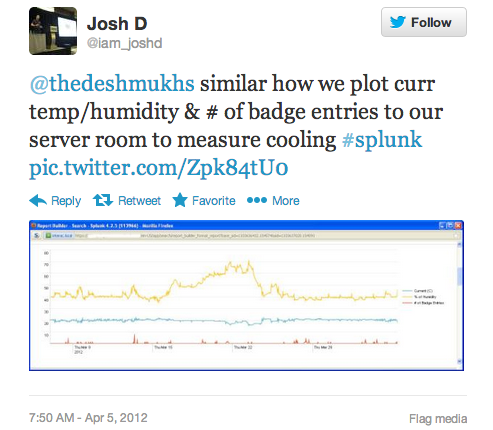
Continuing on with my goal for 2013 of writing more blog posts I figured I’d go back and look at a neat use I found for Splunk and two kinds of data I was able to ingest in to it.
As Splunk has grown in popularity over the last year I started see more and more blog posts, twitter comments, etc regarding various uses for Splunk and most of the time I look over at my own dashboards and see items I’ve had in place for a long time being described.
There was a Case Study published by Andrew Valentine over at the Verizon Business Security Blog titled “Pro-active Log Review Might Be A Good Idea” which details an incident where an employee working for a “U.S. critical infrastructure company” was found to have outsourced his own job to a Chinese consulting firm. Here’s a quick snippet from the Case Study:
“As it turns out, Bob had simply outsourced his own job to a Chinese consulting firm. Bob spent less that one fifth of his six-figure salary for a Chinese firm to do his job for him. Authentication was no problem, he physically FedExed his RSA token to China so that the third-party contractor could log-in under his credentials during the workday. It would appear that he was working an average 9 to 5 work day.”
Decided to finally make public the slide deck I created as a “customer presentation” for a Splunk & Herjavec Group sponsored event here in Toronto on Dec 14, 2012. It was my 6th time being a customer presenter for a Splunk event and as always enjoyed the opportunity to speak, share ideas and meet new faces. So….. Thoughts? Annoyances? Public lashing? I welcome all 🙂 Slides can be found here:
http://www.slideshare.net/iam_joshd/josh-diakun-cust-pres-splunk-partner-event
As I talk to different Splunk users, watch twitter, read blog entries and have the great opportunity to speak and participate in Splunk events I always find it so interesting the various use cases people have for Splunk. True that most organizations have brought it in primarily for Security tasks but time and time again it’s so easy to find other great uses for it. Through these discussions I’ve been able to find many new uses for Splunk, ones which I had not initially thought of or was unsure of how to approach. From this I thought it would be great to have a central point of reference to break down these use cases into the reports/searches built for them so people could gain from others successes.
This application was designed to give users usable data surrounding the requests being sent to their Barracuda Web Filter. The application was designed using data from a Barracuda Web Filter 310, even though the access logs should be universal across the Barracuda Web Filter family of appliances I cannot guarantee it will work with other versions. This app is freely available on Splunkbase here:
http://splunk-base.splunk.com/apps/31192/splunk-for-barracuda-web-filter
Pre-deployment Assumptions:
1. You have enabled syslog logging on your Web Filter appliance.
This application was designed to give users usable data surrounding the activity taking place on their RSA SecurID appliances. This application will work with both the RSA SecurID Appliance 130 and 230 models. It is freely available on Splunkbase here: http://splunk-base.splunk.com/apps/33495/splunk-for-rsa-securid-appliances
Pre-deployment Assumptions:
Finally I’m making this Splunk app freely available to the general public (see attachments to this post). I built this app almost a year ago and it is definitely not near perfection. I built it over a couple of days on spare time to work within our environment where we only have a few USPVM’s. So I can’t speak for how well it scales or how well the searches work over very large data sets. Frankly it works for me and I haven’t had enough spare time to invest into further development or optimization of it. This is why I am launching it here first and not on Splunkbase, sadly in my mind it’s nowhere near ready to be on Splunkbase.